> Apple published HyperCard in 1987, six years before Mosaic, the first web browser
Mosaic was the first Mac and Windows web browser (1992-93) but the first UNIX/NeXT web browser was WWW, 1990-91.
Bill Atkinson (and HyperCard) are awesome though. Imagine a networked HyperCard ushering in the web in 1987; or Intermedia for that matter in 1985; or much earlier in the 20th century a la Vannevar Bush (1930s) or Ted Nelson (1960s); or if Netscape had focused on Gopher, WAIS, FTP, and/or NNTP and dropped HTTP as being superfluous.
I used and programmed HyperCard quite a bit back in the day (even C extensions into HyperCard!). The jump from HyperCard to web is bigger than it appears from the UI:
- to make HC work on the hardware at the time it had quite a lot of optimised MC68000 assembly so it wasn't very extensible which was why it didn't take off like visual basic i.e. you could build stacks but not really apps
- there was no declarative format, stacks were binary files
- It didn't support networking at all as far as I can remember
- Networking at Apple based on AppleTalk so their thinking was very much in the local network, in fact their TCP/IP extension (not built into the OS at the time) was not very well supported.
HyperCard was great, but it was never designed with a browser model in mind, mainly sharing binary stacks between people.
All very true - I also wrote XCMD/XFCN plug-ins back in the day, and my first published technical articles, in MacTutor and Washington Apple Pi magazine, were about how to do that.
HyperCard had more innovations that I miss. One of them was the ability to paint on the card background and foreground layers separately. This meant that you could cover black pixels in the background with white pixels in the foreground.
The HyperTalk language was kind of an oddball, quirky mess; it was designed to closely resemble English, but this actually tended to make it harder to come up with just the right syntax to do what you wanted. But that object-oriented model was carried over into AppleScript, and the whole scripting model for writing scriptable applications. It was not exactly easy to write code that would follow the OSA scripting model, but applications that supported it could be "puppeted" to do some amazing stuff. For example, I wrote a C++ program in PowerPlant which would "puppet" Quark XPress to generate customized newsletters.
Atkinson deserves a lot of credit for making a 68000 do things people could barely believe could be done without custom graphics hardware, and his whole region model (described in a patent) is amazing. And you can now browse the source code for MacPaint and QuickDraw: https://computerhistory.org/blog/macpaint-and-quickdraw-sour...
It's not really legible if you don't have some expertise in 68000 assembly language, but even if you don't, it's still a model of clarity and an inspiration.
Hypertalk (the language of HyperCard) had a lot of syntactic sugar, but was pretty easy to get started with even with almost no programming background.
For example, a very simple button might have a script that looks like:
  on mouseUp
    ask "What is your name?"
    put it into card field "Name"
  end mouseUp
You could get pretty far by reading scripts and trying things out in Hypercard.
I also tend to think that the idea of network aware Hypercard sounds super cool, but would have been a security nightmare. Hypercard wasn't written in an era of adversarial coding, it would have been knocked over 10 different ways every day by hackers. Code and content were heavily mixed together and there was no permission model beyond preventing people from editing your stacks by accident. Every stack or even card you loaded would be downloading and executing code.
>You could get pretty far by reading scripts and trying things out in Hypercard.
I think that's true - but my experience was that it was a good language for beginners, but didn't "scale" well as you started working on more complex programs. The English-like syntax could get in the way as soon as you started to assemble more complex expressions, and you'd be left hunting for the right syntax as if you were playing an old Infocom game. It gave the impression that the parser was more accommodating and sophisticated than it really was, when really it had a rigid syntax like most other programming languages. And because most of the documentation was aimed at beginners, it was hard to find clear answers about _exactly_ what the syntax had to look like when assembling those more complex expressions. It has been a long time since I was writing HyperTalk, but I remember being very frustrated that I couldn't find a formal language spec (in BNF or a bubble diagram or something) the way I could for languages like Pascal.
Still, it really should get a lot of credit for encouraging a lot of beginners to write code and build quite sophisticated little databases complete with all kinds of animations and visual effects that would have been monstrously difficult to code from scratch in C or Pascal. I should also remember that as a programmer and Computer Science student, _I was not the real target audience_ for the language design.
HyperCard inspired Arthur van Hoff to develop a network aware version of HyperCard in PostScript for James Gosling's networked-PostScript-based NeWS Window System. It was originally called "GoodNeWS", then called "HyperNeWS", then finally released as a product called "HyperLook", which I worked on with Arthur and used to port SimCity to X11/NeWS on SunOS/Solaris.
Arthur later went on to Sun, wrote the Java compiler in Java, developed the AWT user interface toolkit, then formed Marimba with Kim Polesi and Jonathan Payne and others from the original Java team, where they developed Castanet and Bongo.
>1996-11-01: Tuning in to Marimba. Kim Polese wants you to upgrade your HTML-based browser to a more interactive, more TV-like, Java-based "tuner" by the name of Castanet.
>Marimba's first product, scheduled to be announced in early October, is the punnily named Castanet, which aims to push Java toward its full potential. Java was created to deliver interactive content over distributed networks, and its much-hyped arrival last year promised to completely change the way information and entertainment are delivered electronically. The first popular Java programs have been based on HTML - for example, the Java applets that lend some animation to boring Web pages. But Java doesn't need the Web to fly. It was designed to communicate over any kind of decentralized system. [...]
Marimba developed Bongo, a Java-based gui toolkit / user interface editor / graphical environment, inspired by HyperCard (and HyperLook), which they used to develop and distribute interactive user interfaces over Castanet.
>Feel the Beat with Marimba's Bongo, By Chris Baron
>In 1996, four programmers from the original Java-development team left Sun to form Marimba and produce industrial-strength Java-development tools for user interface and application administration. Bongo, one of Marimba's two shipping products, allows developers to create either a Java-application interface or a standalone Java-based application called a "presentation." A Bongo presentation resembles a HyperCard stack -- it allows developers to quickly create an application with a sophisticated user interface, but without the tedious programming of directly coding in Java or C/C++. Bongo's nonprogramming, visual approach makes it ideal for producing simple applications that don't involve a lot of processing, such as product demonstrations, user-interface prototypes, and training applications. Bongo is fully integrated with Castanet, Marimba's other product, a technology for remotely installing and updating Java applications.
Bongo was unique at the time in that it actually let you edit and dynamically compile scripts for event handlers and "live code" at run-time (in contrast with other tools that required you to recompile and re-run the application to make changes to the user interface), which was made possible by calling back to the Java compiler (which Arthur had written before at Sun, so he knew how to integrate the compiler at runtime like a modern IDE would do). Without the ability to dynamically edit scripts at runtime (easy with an interpreted language like HyperTalk or PostScript or JavaScript, but trickier for a compiled language like Java), you can't hold a candle to HyperCard, because interactive scripting is an essential feature.
Danny Goodman, who wrote the book on HyperCard, also wrote a book about Bongo. Arthur later founded Flipboard and JauntVR, and now works at Apple.
OMG WAP! I was a member of Washington Apple Pi from the Apple ][ days. I just loved the meetings and journals (a bunch of which are online). Are you the Paul who worked at Computerland?
To give you an idea of just how exciting and groundbreaking and disruptive HyperCard was, and how many people were going totally and justifiably ape-shit about it when it was released, here are the first mentions of it I could find in just the October 1987 WAP journal, talking about how it was the hit of several Mac trade shows:
There was a WAP HyperCARD SIG, and Bill Atkinson even gave a demo of HyperCard at a special WAP meetings!
[...] HyperCard (about which more later)
requires a minimum of about 700K of RAM in which to run. If
you actually want to run two powerful applications at the same
time, you will need the next step up-2.5 megabytes of RAM. [...]
[...] Bernie reported that Bill Baldridge has done some interesting work on a HyperCard application which would describe WAP. Tom's picture is already on the HyperCard stack. Bernie hopes to see a complete package at dealers when we have it completed. [...]
[...] We ended on a happier note with a demonstration of Bill Atkinson's amazing HyperCard, the hit of the Boston Expo and a program which will no doubt be fully discussed elsewhere in the Journal. [...]
With Mac fever, all kinds of people clamored around the Expo floor with Mac tote bags, filling them up with complimentary copies of MacWeek, MacUser, MacWorld, MACazine, The
Macintosh Business Letter (premiere edition) and hundreds of flyers being handed out by hawkers dressed in medieval costumes or business suits or T-shirts. Terms like Connectivity, MultiFinder, HyperCard and "stackware developer" were tossed
about even more freely.
As everyone knows now, HyperCard was the main feature at the Expo; a new programming environment had been introduced. It was programming for "real people", as Jean-Louis
Gassée explained it. Super star Bill Atkinson had created a combination operating system shell, database manager and programming environment with this "real person" user interface. No one could seem to clearly describe all that HyperCard could
do; but everyone in the know alluded to its potential. John Sculley called it a "personal information tool kit" in Apple's press release. It is an organizer of words, numbers, sounds and pictures into programs coined "stackware". You will see "stackware" everywhere soon (already there are "stackware" downloads on WAP's BBS). You won't fully appreciate HyperCard until you have tried it. Let me warn you, HyperCard screams for
memory, so it is a great lead-in for adding 1 meg chips or better yet, CD-ROM. Now, we need some import utilities so we can easily load existing databases into stacks regardless of the delimiters.
Jean-Louis Gassée was the Wednesday afternoon speaker.
Sporting a three piece suit and diamond earring, he told his
audience, "PCs are the wings of the mind" and that they would
eventually enrich the quality of human life. He added, that
HyperCard would also change the world and the way computers
deal with information-in a more human like way. It really did
sound like "hype card" might have been a more descriptive name
for the software. I think I was supposed to leave that session on
a kind of religious high, a Macintosh religious high. However, I
was more intent on finding a rest room with less than 25 people
in line.
The second-strongest impression I came away with was the
number of companies that will not be around in two years' time,
or that will be back in 10-foot by 10-foot booths instead of large,
open displays on the show floor. In databases; for example, 4th
Dimension was there solidifying its toehold on the high-end
database market. With HyperCard--being distributed free with
Macintoshes bought beginning August 11--capturing much of
the low-end database market, it is easy to see those two products
(along with, perhaps, dBase Mac, which may gain a niche in
those businesses where dBase III is king) dividing the Mac
database world amongst themselves. I would not want to be a
stockholder in Blyth Software (Omnis) or Odesta (Helix). [...]
A few other MacWorld impressions: HyperCard was, to
most, the hit of the show. It is hard to describe but easy to
understand when you see it, which I urge everyone to do. It
combines some aspects of a regular low-end database application,
FileVision (a graphics database), and hypertext (such as
Owl's Guide program). Bill Atkinson and others have put an
enormous amount of work into making it very fast. But one of
the most impressive capabilities is its "authoring" capability,
that will let non-programmers set up programmable database
applications without too much difficulty. For those a little more
adventurous, HyperTalk is a relatively simple programming
language that allows HyperCard to do some pretty sophisticated
things. In many respects these "authoring" and programming
capabilities represent something of the case of use and power that
Applesoft BASIC represented for the Apple II: the return of the
weekend programmer. Apple is, as noted above, bundling it free
with Macs sold on or after August II, and the list price for us
pioneers is $49.95.
  Special Meeting
  Saturday November 7, USUHS
  9:00 AM until ?
  Bill Atkinson and friends on HyperCard
  Definite Maybe!
The "Smell" of Mac Expo, by Martin Milrod
The Boston MacExpo, August 11-13, '87, had four major
themes: big screens, color, accelerator cards and HyperCard.
Those have been commented upon elsewhere, and I'll not repeat
the technical descriptions in depth. My purpose is to give you the
"smell" or personality of the Expo. [...]
The last major announced product is HyperCard developed by
Bill Atkinson of MacPaint fame. He has been working on
HyperCard for three years and it has been described by Bill as the
greatest microcomputer announcement since the Macintosh. If
you spent three years of your life working on one project. I guess
you would like it to be called the greatest product since sliced
bread.
Acceptance of HyperCard may be hindered by a lack of true
understanding of just what it is. It is an innovative product that
will eventually integrate graphics, text, music, voice and animation into a programmable interactive environment. It is supposed to allow users to organize data the way humans think and not the
way computers impose on the user. It is also described as the first
of a new kind of software applications called "stackware."
Rolodex style index cards are used to store data and a group of
cards is called a "stack." It is based on the idea of a card file, with
each card equal to a screen full of information that can be
searched and linked together. Searching stacks of millions of
cards is reported to be very fast. Since I'm getting confused
myself, I will quote from Apple's literature on this product.
"You make notes, type, or draw on them just as you might on
paper index cards. You can sort cards, browse among them, or
quickly find specific information by pointing and clicking on
"buttons." "Buttons do specific tasks, such as linking or connecting one card to another. Buttons can also do many other things,
such as dialing a phone, printing a report, and even launching
other applications." HyperCard also comes with "HyperTalk"
which is a powerful English scripting language which permits
users to write script directions to buttons. Professional developers can use HyperTalk to control external devices such as
videodisc players, on-line information services and CD-ROM
drives.
HyperCard requires a Macintosh Plus, SE or II with at least
1 meg of RAM, and 2 megs is required if you want to use
HyperCard with other applications under MultiFinder. If your
still confused you have lots of company. Only time will tell just
how useful or great HyperCard really is. Apple will begin
bundling it free with all new Macintoshes but it will be available
with documentation for $49 to current Macintosh users.
Book Reviews, by Robert C. Platt.
"The Complete HyperCard Handbook" by Danny
Goodman (1987 Bantam Computer Books, 720 pp., $29.95)
This book is such a hot seller that copies at each of the B. Dalton's
sold out within three days of the book hitting the shelves!
HyperCard is a hypertext manager for the Macintosh which
Apple will now bundle with each new Macintosh as system
software. "Hypertext" in turn is a data base-like concept pioneered by Ted Nelson in a book Literary Machines, which I
reviewed in the August 1983 WAP Journal. Hypertext links
individual frames of information into a complex web of cross-references, unlike a normal book which is linear from the first
page to the last HyperCard implements this concept through a
me card metaphor. Each frame is a card that is the shape of an
original Mac screen. The user can navigate between frames
according to cross-references developed by the author. Cross-references can be symbolized by icons (called buttons.) In
addition, cards can be retrieved using a "find" command in the
message window in a manner similar to that of a classic data
base.
Goodman was brought into Apple's HyperCard project at an
early stage, and it is no accident that his book is out simultaneously with the product's release. In fact, his book is available
before the beta version of a promised Inside HyperCard reference book for programmers. The downside is that Goodman is
a bit of a gushing HyperCard evangelist. Along this line, the
book includes a gushing forward by John Sculley and a 12 page
interview with HyperCard's creator Bill Atkinson.
The book devotes most of its pages to the introductory levels
of HyperCard--the browsing and authoring levels. In my
opinion, Goodman's treatment of HyperTalk, the HyperCard
programming language could have used more complete examples. Certainly Goodman does a much better job of presenting
authoring than does the Apple manual that is bundled with the
HyperCard product. In fairness, I note that Apple promises to
distribute a HyperCard Technical Reference through APDA.
However, Goodman should have expanded Part 4, "Applying
HyperCard and HyperTalk." That section gives the complete
listing for a Corporate Directory (a locator map system with
"hard links"); a Telephone Logbook (a rolodex which also
records individual calls); an Attorney Time Sheet; a "To do" list;
a metric/English measurement converter; and a project planner.
Although these examples are impressive, I fear that a number of
programming subtleties are not covered.
On the whole, I recommend the book, despite its hefty price.
But be aware that the serious HyperTalk
programmer will need more documentation than just this book.
(Ed. Note: Rich Wasserstrom has arranged a group purchase on this book and
it is available at the office for $17.95 plus
tax, while the supply lasts.)
Data Bases
Bill Amon on 09/03
At 4:30 pm today (Thursday, Sept. 3), Ashton-Tate issued a news
release indicating that dBASE Mac is now shipping. The last beta
version was 1.0x1l4. I understand that they already have an
order backlog of 10,000 copies! I asked about what the final
version's performance situation was--according to product
development, there are substantial improvements. I'll be getting
my copy within a week or two and I'll let you all know! For David
Gursky--yes--NOW we can start our testing. I have already
received HyperCard and 4th Dimension--I really think they
should be included. Most data base applications I firmly believe
could be done easily in HyperCard--I love it! Well, let's get on
with it.
Bill Baldridge on 08/28
Received the Course Builder demo disk today--pretty fast! The
interesting thing is it was written by William C. Appleton, of
World Builder fame, if memory serves... Anyway, I haven't
really played around with it yet (too busy with HyperCard right
now), but so far my main criticism is they use Macintalk to voice
text and dialogs; [...]
HyperCard
Bill Baldridge on 08/30
Describing HyperCard in one sentence is as easy as writing the
Gettysburg Address on a 22 cent stamp with a dull pencil. A
simple description would be an application with which a user
may build a stack of cards--each card storing information in any
computer retrievable format (i.e., graphic, alphanumeric, digital,
etc.). Any part of any card may be tied to any part of any other
card by a relation--the relation to be defined by the creator or
user (at lower levels) using "scripts." Scripts allow specific tasks
to be performed by a button, field, card, or stack (here presented
in inverted hierarchy). Lastly, any STACK may be tied to any
other stack by these relations... The mind boggles.
Jeffrey Barnes on 08/30
I have pretty well finished reading the HyperCard manual and
have "fooled around" with the application a bit. I bought it
because I didn't know any way to find out what it was other than
to get the thing. It is my opinion that HyperCard can be referred
to, among other things, as:
1 - A high level language specifically designed for the Mac.
I have programmed the Mac in BASIC and C and I would liken
such programming as similar to programming graphic workstations hooked to mainframes--TEDIOUS! It's sort of like playing the banjo--something I would like to know how to do and then not do it.
2 - A very rich job control language for the Mac. I would liken
it to DCL on a VAX in the sense that the lexical functions in VAX
DCL are equivalent to the graphics "hooks" in hypercard.
3 - A sort of "graphics database language". The capability to
"link" cards to other stacks/cards really opens up many possibilities.
4 - Has the promise of being a really useful and efficient
macro generator for the Mac. I have TEMPO and TOUCH-NGO and consider them very crude. I am hoping for better things
with Hypercard. In short, I think that all of the packages for the
Mac that I am familiar with, such as MS WORD, are merely a
standard computer application written for the Mac. Admittedly,
such packages follow the Macintosh interface and that is a great
leap forward but any standard interface puts the burden on
development programmers.
The real test will be--how complex an application will Hypercard allow a programmer to construct.
Rick Stickle on 08/30
Bill, I don't believe this--I got HyperCard at Clinton yesterday
and signed on tonight to suggest that a Hypercard section be set
up! I now see there are just some people that you can't get the
jump on.
[... and much more discussion about HyperCard from the WAP BBS ...]
HyperCard SIG by Robert C Platt
WAP is organizing a HyperCard SIG for persons interested
in exploring Apple's new hypertext driver. The group will focus
upon available stackware and the HyperTalk programming language. In order to identify potential members and what they want
in a SIG, two organizational meetings will be held at the end of
the regular WAP meetings on Saturday, September 26 and
October 24. A permanent meeting location and time will be
selected at the October session. See the review of Danny
Goodman's HyperCard Handbook elsewhere in this issue for
more information on HyperCard.
No, but I wrote a couple of articles on how to write XCMDs/XFCNs for the Washington Apple Pi Journal, then also some stuff for MacTutor. I was a student at the College of Wooster then (in Ohio) so I never actually _went_ to a WAP meeting... but my roommate Ken Knight was from the DC area.
There was actually some type of Gopher server built on top of HyperCard. I don’t know all of the technical details, but my first paid program was a college that asked me to port a freeware Hypercard chat app I wrote to it.
While there was a debate at the time about whether HyperCard was truly "Hypertext" or a "User Interface Design Tool" or a "Personal Database" or just how to classify it, the much more important thing was that it was not just a browser, but also an authoring tool, that enabled regular users to switch back and forth between browse mode and edit mode WHILE they were using it, and empowered users as authors.
This is in stark contrast with the other hypertext browsers, authoring tools, and user interface design tools of the time (the cutting edge of which was the NeXT Interface Builder), that made a distinction between "run time" and "design time", and did not enable ordinary users to switch into design or edit mode while the normal application was running, which was absolutely essential to HyperCard.
At the beginning of the web, browsers did not have the ability to author hypertext (and server-side authoring tools like Medium or even AJAX-y client-side authoring tools did not exist yet). So authoring tools (and user interface editing tools) were big and expensive and complex and not user friendly, and there was often a compilation step between editing and browsing in a different program, so you couldn't just pop into edit mode and tweak the actual specification then pop back into browsing like you could do with HyperCard.
Eventually Netscape and Internet Explorer got some shitty half-assed WYSIWYG editing abilities that were sub-par, and produced terrible HTML, and couldn't be applied to any web page, and required a lot of other user interface support to be usable even for the most trivial kinds of editing, but that was a far cry from the comprehensive fully integrated high fidelity WYSIWYG browsing/editing tool that HyperCard was from day one.
In fact, one of the earliest tools that enabled anyone, even children, to author and publish their own interactive dynamic web applications with graphics, text, and even forms and persistent databases, was actually based on HyperCard and the MacHTTP/WebStar web browser on the Mac:
>One of the coolest early applications of server side scripting was integrating HyperCard with MacHTTP/WebStar, such that you could publish live interactive HyperCard stacks on the web! Since it was based on good old HyperCard, it was one of the first scriptable web authoring tools that normal people and even children could actually use! [8]
>[8] MacHTTP / WebStar from StarNine by Chuck Shotton, and LiveCard HyperCard stack publisher:
>Cal discusses the Macintosh as an Internet platform, then describes how you can use the AppleScript language for writing CGI applications that run on Macintosh servers.
The coolest thing somebody did with WebStar was to integrate it with HyperCard so you could actually publish live INTERACTIVE HyperCard stacks on the web, that you could see as images you could click on to follow links, and followed by html form elements corresponding to the text fields, radio buttons, checkboxes, drop down menus, scrolling lists, etc in the HyperCard stack that you could use in the browser to interactive with live HyperCard pages!
That was the earliest easiest way that non-programmers and even kids could both not just create graphical web pages, but publish live interactive apps on the web!
>Livecard has exceeded all expectations and allows me to serve a stack 8 years in the making and previously confined to individual hospitals running Apples. A whole Childrens Hospital and University Department of Child Health should now swing in behind me and this product will become core curriculum for our medical course.
Your product will save lives starting early 1997. Well done.
- Director, Emergency Medicine,
Mater Childrens Hospital
  The following is taken from the LiveCard web site
  (http://www.royalsoftware.com):

  "LiveCard is a HyperCard add-on that enables remote users to browse
  and interact with HyperCard files, called "stacks", on your web
  server. Once installed, you'll be able to serve any HyperCard stack
  without extensive preparation - often with no preparation at all.
  This means you have all the advantages of HyperCard as part of your
  server solution, plus you can now serve those stacks to anyone on
  the Web, regardless of whether they're using a text- or
  graphics-based browser and regardless of their platform: Macintosh,
  Windows, UNIX, whatever."

  "LiveCard implements a CGI (Common Gateway Interface) between
  Macintosh servers, such as WebStar, and HyperCard. It makes the
  HyperCard interface available as high-resolution, compressed
  image-maps and HTML form elements, and transforms user gestures in a
  web browser to a format HyperCard can understand. LiveCard
  translates between HTML, HTTP, and HyperCard "on the fly," requiring
  little or no preparation of the HyperCard stack. LiveCard generates
  HTML dynamically - as stack content and functionality changes, these
  changes are reflected live in the remote users browser."

  What does this mean for you? Well, if you have access to a Macintosh
  web server running WebStar, MacHTTP, or similar server software that
  is cgi-aware, you can serve your stacks using LiveCard. LiveCard can
  generate an HTML forms page using the text fields on the card, an
  image map with stack graphics and buttons that responds to user
  clicks (although the buttons can't highlight), or a combination of
  the two. In addition, each generated page has a header and footer
  that can be set by scripting...and is HTML aware. This gives an
  incredible amount of flexibility.

  Note that LiveCard requires a Macintosh web server (not really a
  criticism... I love Mac servers...but you do have to have access to
  the server, and it *has* to be a Mac, since LiveCard is
  HyperCard-based). And to fully realize the potential of LiveCard,
  you need to learn some new commands...but there aren't too many, and
  they make sense. Plus, the examples provided are very helpful. At
  this point in time LiveCard has a limited ability to work with
  QuickTime...you can kludge your way around the limitations, but if
  your stack relies on a lot of QuickTime, you have to do some serious
  modifications. Rumor has it that future versions will have more
  QuickTime functionality. But for static graphics (color spoken
  here!), there are no modifications.

  Where LiveCard really shines is in the area of forms and databases.
  I created a stack to be used for a course I was teaching...very
  simple, with about 5 text fields for the students name, college,
  major, and a topic they were interested in. I then just dragged this
  stack into my server folder where LiveCard resides. That was it. I
  called up my page on a browser (remember, any browser, any
  platform), went to the LiveCard page, clicked on the link to my
  stack (automatically created by LiveCard), and there was a
  forms-based page with all of the fields...including their labels. I
  filled the page out and hit submit. Voila...the data appeared on the
  stack residing on my server. Now that is cool.

  Pros: Can serve your stack mostly without modification. Can use
  externals in the stack. Browser is *completely* platform independent
  since a plug-in is not required. Data can be easily transferred
  between web page and stack. Leverages existing HyperCard stacks,
  especially databases and order processing.

  Cons: Requires a Macintosh web server. Limited ability to work with
  QuickTime. Can be a tad slow. Lose button highlights and card
  transitions.

  3. Convert your stack to a SuperCard project. Allegiant (makers of
  SuperCard - http://www.allegiant.com) has recently released
  Roadster, which is a plug-in for Netscape navigator. Roadster is in
  public beta at this time (December '96), and is available for both
  Mac *AND* Windows 95. Can anyone say cross-platform? Before you get
  too excited, remember that you first have to convert your HyperCard
  stack into a SuperCard project. This is fairly painless
  however...unless you use externals. Externals present two problems
  for the SuperCard/Roadster approach...they don't always convert, and
  more importantly, at this time Roadster does not support *any*
  XCMD's. This is due to security concerns (you could do some nasty
  damage to a client computer...kinda like a java applet gone bad). A
  future intranet version of Roadster may show up that supports
  externals. Another potential problem is that Roadster only supports
  a single window. Now this might not be a problem for HyperCarders,
  since one window is the norm. But for dedicated SuperCard people
  that have grown used to multiple windows in projects, some tinkering
  has to be done.

  Since Roadster is a plug-in, you get some more good news and bad
  news. The bad news is that people have to download the plug-in and
  install it into their Netscape Plug-ins folder before they can view
  your project. The good news is the plug-in is free, and your project
  runs in the browser exactly as it does on the desktop...buttons
  highlight, transitions work, etc... And perhaps even more
  importantly, Roadster is available for Windows, so you can finally
  get your stack into the hands of the unfortunate Intel-laden masses.

  Pros: Project looks and runs just like on the desktop.
  Cross-platform. Ability to transfer information via forms commands.
  Ability to cache and preload graphics. Very good with external media
  such as QuickTime, audio, etc.

  Cons: Have to convert your stack. Browser requires plug-in. Lose all
  functionality of externals.
Yes, lots of good HyperCard memories for me. One convention that didn't make it to the web browser was having a key (option?) you could press to highlight which elements were clickable. Lots of modern webapps could use that...
Yes definitely there should be a way to highlight all possible links! And also instead of "disabling" links and buttons and other elements so they are inexplicably useless, they should be dimmed but still enabled, so hovering or clicking on them immediately tells you WHY they're disabled, and WHAT you can do to enable them.
HyperTIES was an early hypermedia browser and authoring tool developed at the University of Maryland Human Computer Interaction Lab under the direction of Ben Sheniderman. (I helped develop the NeWS version of HyperTIES in PostScript, FORTH, and Emacs MockLisp on the Sun.)
It had both text and graphical "embedded menus" as links, that highlighted text and popped up magnified arbitrarily-shaped cookie-cutter targets with drop-shadows when you pointed at pictures with embedded links, and it highlighted all of the text and graphical links at once when you clicked on the background.
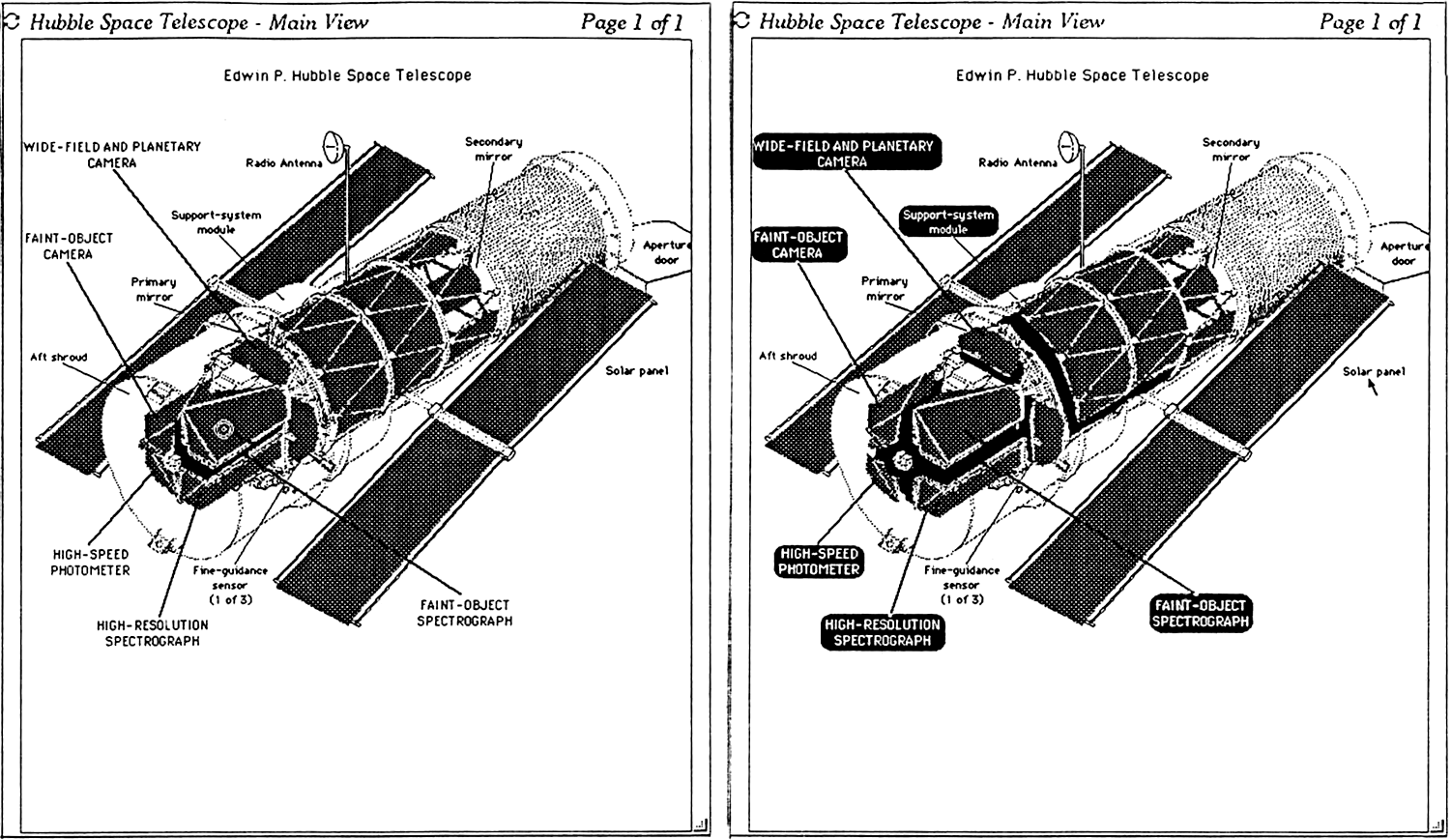
We had a cool demo of the The Hubble Space Telescope with a diagram that popped up all the different parts of the telescope. And also a photo with pop-up targets on the three heads of the Sun founders!
Ben also showed a fun NeWS / PostScript / PSIBER / PseudoScientific Visualizer / ARPAnet map demo later in that talk, which also shows clicking in the background of the PSV to highlight everything at once (the X-ray view of the ARPAnet map, at 28:10):
>Hyperties incorporates graphics while preserving the embedded menu approach used for text only documents. A displayed page can mix text and graphics while allowing arbitrarily-shaped regions to be designated as targets, which provide links to other articles. The addition of graphics provides significant advantages (14). Information that is structured in the form of charts, graphs, maps, and images may be explored with the same facility as text. But the use of graphics in hypertext requires more work on the part of the author to produce comprehensible documents. There is no simple technique for emphasizing the targets that is acceptable in all cases, and the author must laboriously link targets to their references (they are not “self-naming”, as in the text case). In the Sun version of Hyperties rudimentary tools have been developed to simplify the author’s job of establishing graphical links between entries. These consist of editors for designating arbitrary regions of an image using rectangles or polygons, associating names with these regions (which are used by the system to locate references), designating their appearance when highlighted, as well as overall management facilities for keeping track of graphics that have been produced.
>Identifying Selectable Items
>Several existing hypertext systems permit the browsing of mixed graphics and text, but none has carefully addressed the problems inherent in this more complex realm. Apple Computer’s HyperCard (15) makes minimal distinction between textual and graphical elements of a database entry; anything can be selectable (linked to a reference) if the author so chooses, but it is left to the author to provide hints to the user about what is selectable. (However, it is possible to obtain a temporary display of selectable regions, highlighted by bounding rectangles, via a modifier-key combination.) Brown University, in its Intermedia system (16), has, in a sense, eliminated selection of graphical and textual elements entirely; instead, all links are indicated by special icons, which the author may place at will. This scheme has the advantages of simplicity and clarity, but risks obscuring pertinent information in a welter of special symbols, and may introduce ambiguities of reference: for example, in a map of the United States, does a particular icon refer only to New York City, or to the entire state of New York? A slightly different approach is taken by Guide (17), which provides four different types of linkages; the presence of a link and its type are indicated by changes in the appearance of the screen cursor as it is moved about the display and encounters selectable objects.
>An important problem is how to indicate to a user the selectable elements of a graphic. It is clear that some scheme is needed to do this — expecting a user to hunt after the targets in an image by trial and error is apt to cause frustration with the system and limit its use. Any scheme chosen must satisfy certain requirements: it must unambiguously identify the location and scope of the target, it must not itself interfere with comprehension of the image, and it must require little effort on the part of the user. Possible solutions include highlighting the targets by dynamic indicators, outlines, inverse video, fixed symbols, color, shading, and image manipulation (13,14).
>The approach taken in Hyperties has been to allow arbitrarily-shaped regions of an image to define these link targets. Normally, these regions are not distinguished in any way (other than visual cues that an author may choose to provide); however, when the mouse cursor passes over a target region, it becomes highlighted. The highlighting scheme developed is novel, and has met with favorable comments from users: it is referred to as pop-out, and consists of offsetting the highlighted object vertically and horizontally by a small amount, and placing a drop-shadow beneath. This gives the appearance of having the object pop out of the screen (Figure 5a); in addition, the slight movement of the object makes it readily detectable to the eye. Because of the use of arbitrary regions, there is no ambiguity of reference; because highlighting only occurs in response to user demand, the image itself is not cluttered; and because the targets highlight automatically in response to mouse movements, the interface requires minimal effort.
>One remaining problem is that it is not possible to identify the links in an image at a glance. However, certain user behaviors were noticed: when confronted with an image with hidden targets, they tend to sweep across the image until a target is highlighted (becomes designated), or try to select what they think might be a target until one is found. This suggested that the system could highlight all of the targets automatically (for a short time) whenever it appears that the user is searching for targets, as when sweeping the display, or clicking in non-target areas. This latter strategy has been implemented in the NeWS version of Hyperties. Whenever a user attempts to select in a non-selectable region (like the background), all targets are revealed (Figure 5b). This technique was found effective and generally very well received by users.
>Figure 5: (5a: left) The main view of the telescope. The cursor is now resting on the Faint Object Spectrograph which “popped out” to show the existence of a link (compare with Figure 1). Of course the dynamic effect cannot be rendered in this figure.
(5b right) A click on the background shows all targets available on the picture.


Mosaic was the first Mac and Windows web browser (1992-93) but the first UNIX/NeXT web browser was WWW, 1990-91.
Bill Atkinson (and HyperCard) are awesome though. Imagine a networked HyperCard ushering in the web in 1987; or Intermedia for that matter in 1985; or much earlier in the 20th century a la Vannevar Bush (1930s) or Ted Nelson (1960s); or if Netscape had focused on Gopher, WAIS, FTP, and/or NNTP and dropped HTTP as being superfluous.